Connect the STT J8 RF cable (4-notch end) to the STT J8 receptacle. Then, connect the SMA end (using a Type N to SMA adapter) to the antenna extension cable for the Link 16 Antenna.
Connect the STT J9 RF cable (3-notch end) to the STT J9 receptacle. Then, connect the 50-Watt Terminator (using a Type N to SMA adapter) to the loose end of the J9 cable.
Connect one BNC end of the UHF/VHF RF Cable to the STT J7 receptacle. Leave the other end loose for now.
Connect the STT J5 end of the Power Input Cable to the STT J5 receptacle. Tighten until the red ring is not visible.
Connect the large singular end of the CH1 Red Control Cable to the STT J1 receptacle. Tighten until the red ring is not visible.
Connect the male end of the CH2 Audio/Fill Cable to the STT J10 receptacle. Tighten until the red ring is not visible.
Connect the large singular end of the Black IO Cable to the STT J3 receptacle. Tighten until the red ring is not visible.
Connect the male end of the CH1 Audio/Fill Cable to the STT J4 receptacle. Tighten until the red ring is not visible.
Connect PacStar 447 Router to CH1 CONTROL ETH 1
Connect PacStar 447 Router to CH2 CONTROL ETH 1
Connect PacStar 447 Router to PacStar 453 Server
Connect PacStar 447 Router to GIZMO
Connect the USB Hub to a PacStar 453 USB 3.1 port. Connect an external monitor to a PacStar 453 Display Port/HDMI output.
- Preferred: Connect GIZMO INT 1/2 cable (INT 2 USB end) to the PacStar 453 USB/Hub.
- Alternative: Connect GIZMO INT 3 cable (USB end) to the PacStar 453 USB/Hub.
- RDP Interface Configuration:
- IP: 192.168.69.17
- Subnet Mask: 255.255.255.0
- Gateway: 192.168.69.117
- VMF
- STT Software or Mission Plan install
Click on an image to enlarge.
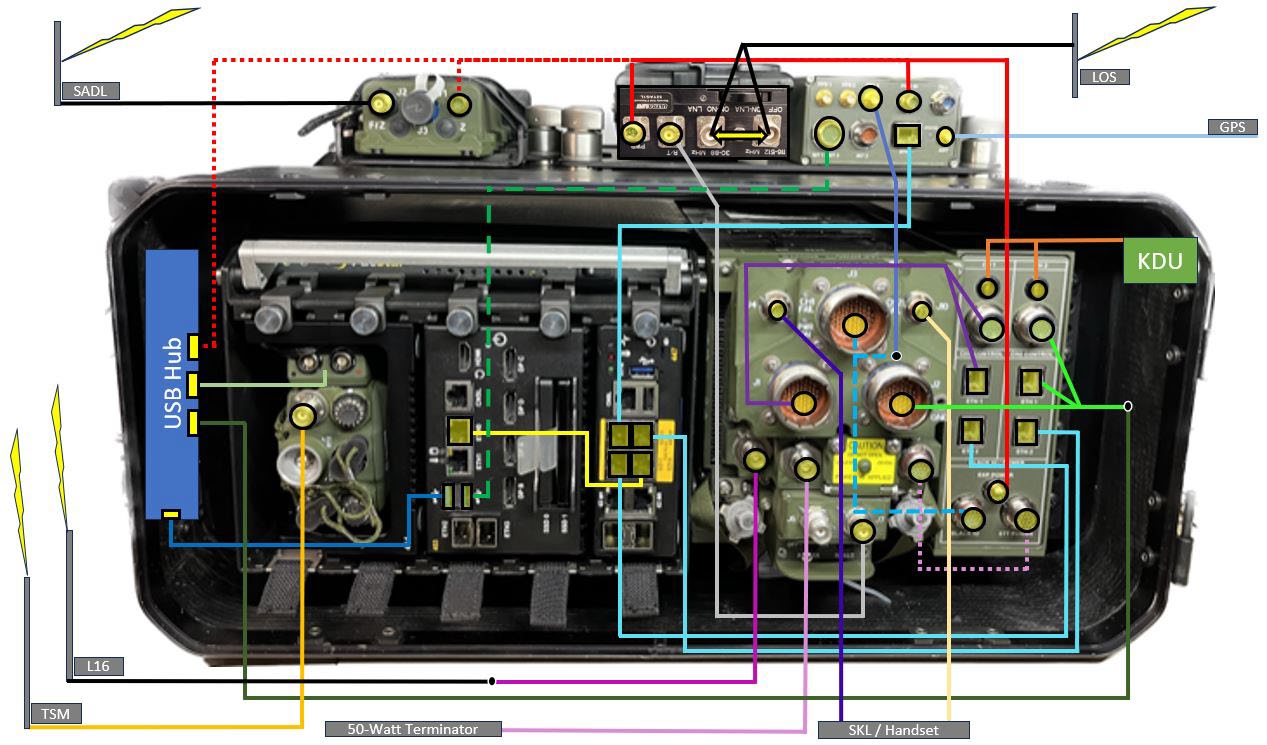
Main Cabling Diagram
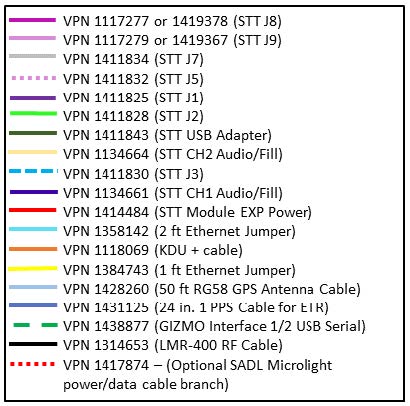
Diagram Legend